100% offline · zero telemetry

Turn your Android phone into a Wi-Fi analyzer & indoor site survey tool.

Paint real RF coverage heatmaps on any floor plan with biomechanical step tracking, chart 2.4, 5 and 6 GHz spectrums in real time, and get a star-rated recommendation for the least congested channel. No account, no cloud, no data collection.
2.4 · 5 · 6 GHz
Tri-band coverage
320 MHz
Wi-Fi 7 channels
PDR + IDW
Step kinematics
0% cloud
Offline & private
WifiHeatmap live floorplan survey on Android: a rainbow RF coverage heat haze in orange, yellow, green and blue spread across a floor plan, with the walked survey path and green sample markers labelled from -31 dBm to -60 dBm
Live survey
Inverse Distance Weighting Weinberg step detection 2.4 / 5 / 6 GHz 320 MHz (Wi-Fi 7) Free-Space Path Loss OUI vendor lookup BSSID roaming log Traceroute & DNS Barometric floor detection CSV + heat report export

Interactive feature suite

Engineered for precision RF analysis

Five tools in one offline app — tap through the real screens below to see exactly what network engineers use on site.

PDR Indoor Survey

Floorplan signal heatmaps

Walk freely while your phone maps RF coverage step by step.

Import any floor plan and walk naturally. WifiHeatmap fuses biomechanical step detection (adaptive Weinberg formula) with orientation sensors to chart your continuous path, then interpolates signal contours with Inverse Distance Weighting (IDW).

  • Weinberg step detection with heading-sensor fusion
  • Inverse Distance Weighting (IDW) gradient contours
  • Multi-floor surveys via barometric altitude detection
  • Walk, A→B, tap-pin and GPS survey modes
  • Export heat report images and raw survey CSV
Access Point Inspector

Every beacon in the air, decoded

Full technical detail for each access point around you.

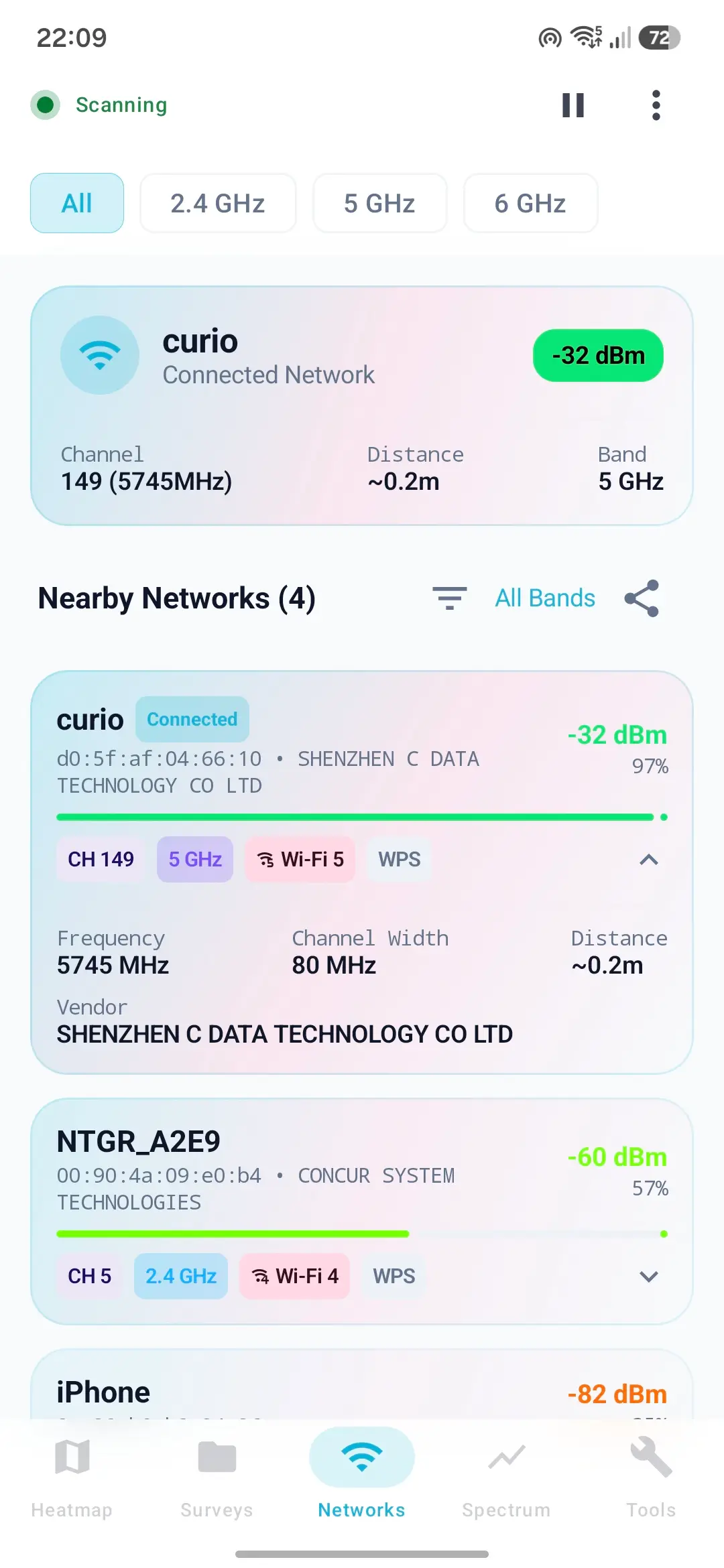
Inspect channel, frequency, link speed, signal and estimated distance for every nearby access point. The built-in OUI vendor database identifies router manufacturers, while the roaming logger records BSSID handoffs as you walk.

  • Complete or compact access point views
  • Estimated distance via Free-Space Path Loss (FSPL)
  • Security detection: WPA3, WPA2, WEP, WPS, OWE, EAP
  • Wi-Fi standard identification up to 802.11be
  • Fast-roaming flags: 802.11k / 802.11v / 802.11r / OKC
Spectrum Analyzer

Tri-band channel graphs

Visualise frequency overlap across 2.4, 5 and 6 GHz.

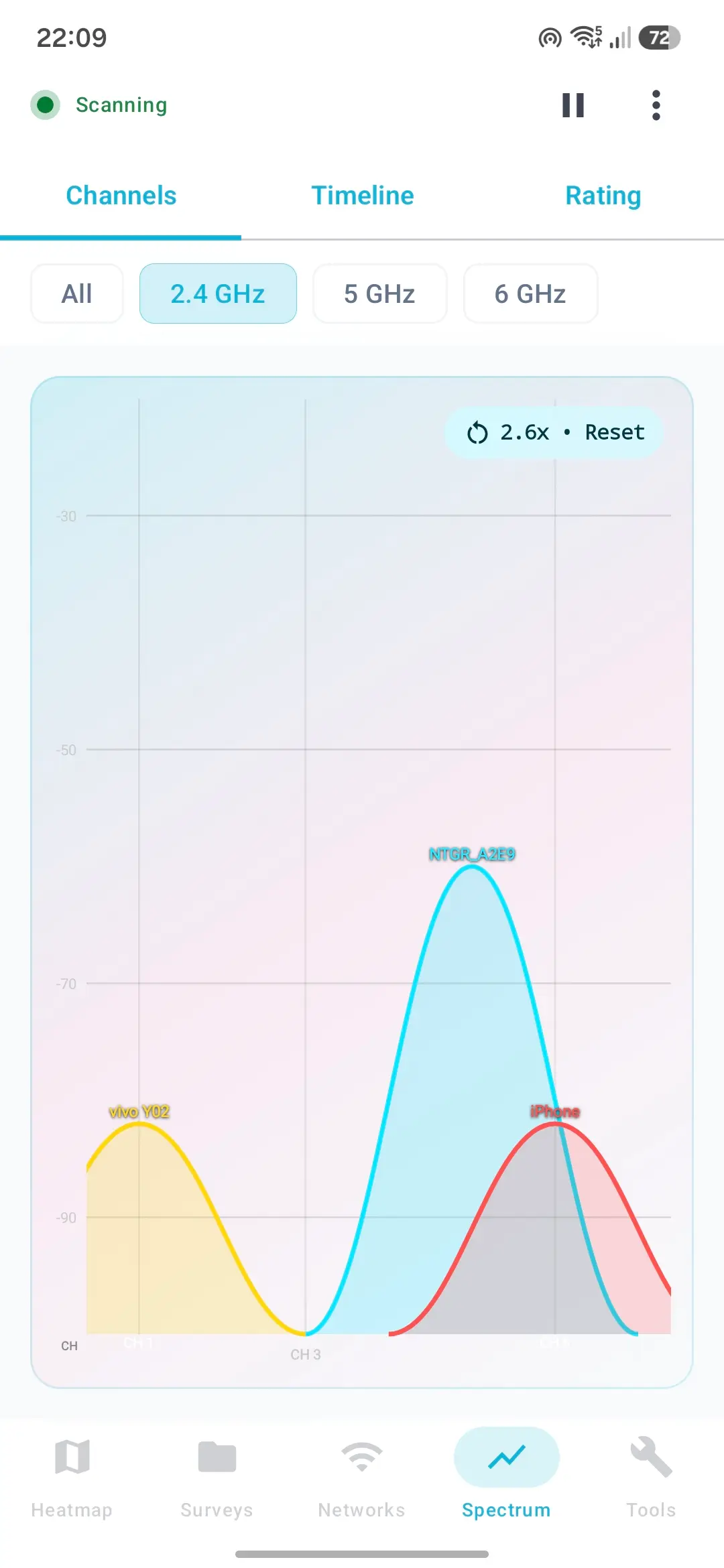
Inspect complex RF environments in real time. View overlapping parabolic channel curves, detect bandwidths up to 320 MHz (Wi-Fi 7), and isolate interference from legacy 802.11b/g up to modern 802.11be networks.

  • 2.4 GHz, 5 GHz and 6 GHz (Wi-Fi 6E / Wi-Fi 7) support
  • Channel width detection: 20, 40, 80, 160 and 320 MHz
  • Live scan counter with scan-throttle detection
  • Pinch to zoom and pan across the 5 / 6 GHz axis
  • Filter by band, signal strength, SSID or security type
Intelligent Scoring

Channel rating & optimisation

Identify zero-interference channels in crowded spectrums.

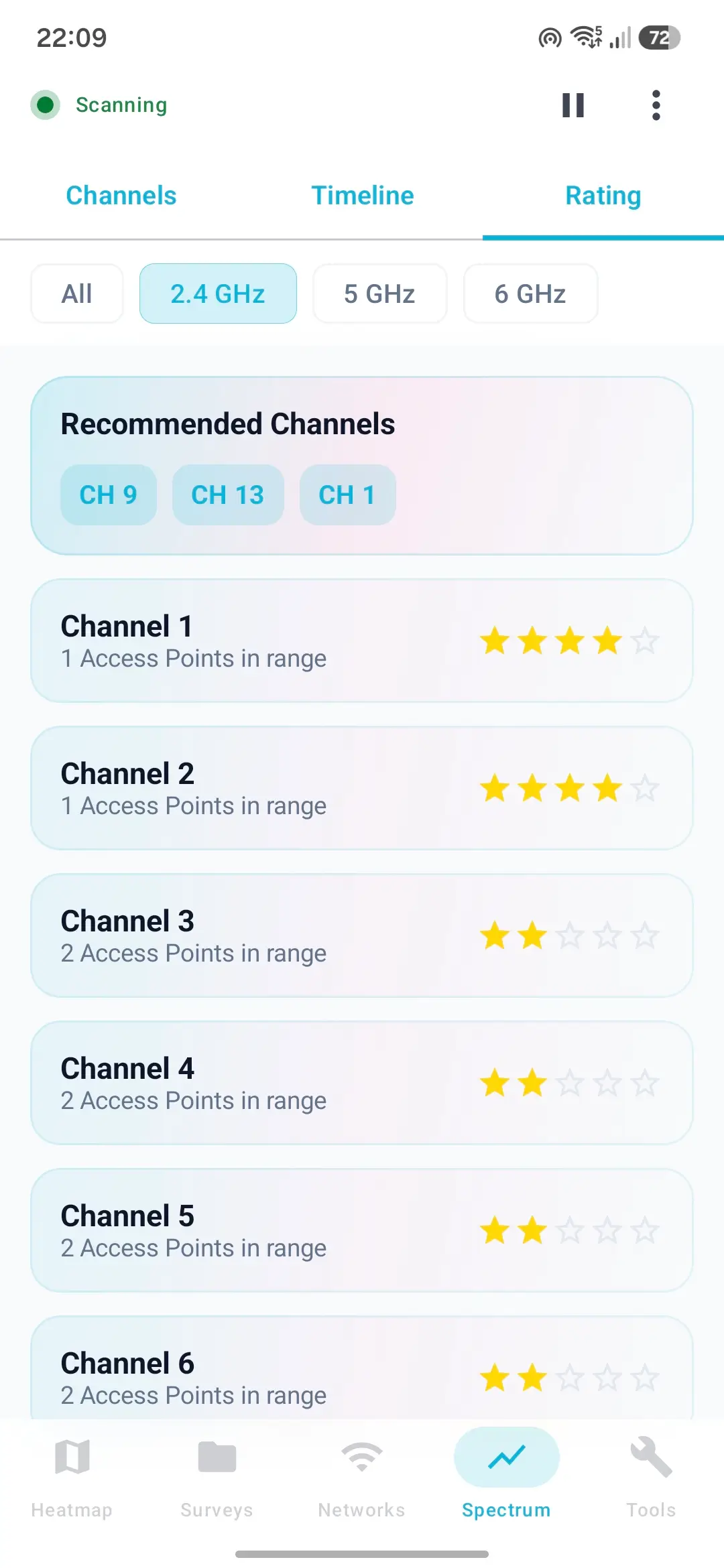
Stop guessing which channel to configure on your access points. WifiHeatmap evaluates co-channel and adjacent-channel congestion to award transparent 1-to-5 star ratings for every available channel, and recommends the cleanest ones.

  • Instant best-channel recommendations for 2.4 & 5 GHz
  • Co-channel vs adjacent-channel interference breakdown
  • Active access point count per channel
  • Transparent 1–5 star scoring you can audit
  • Recommended channels listed up front
Diagnostics & Performance

A full network toolkit

A complete diagnostics bench for any wireless network, in your pocket.

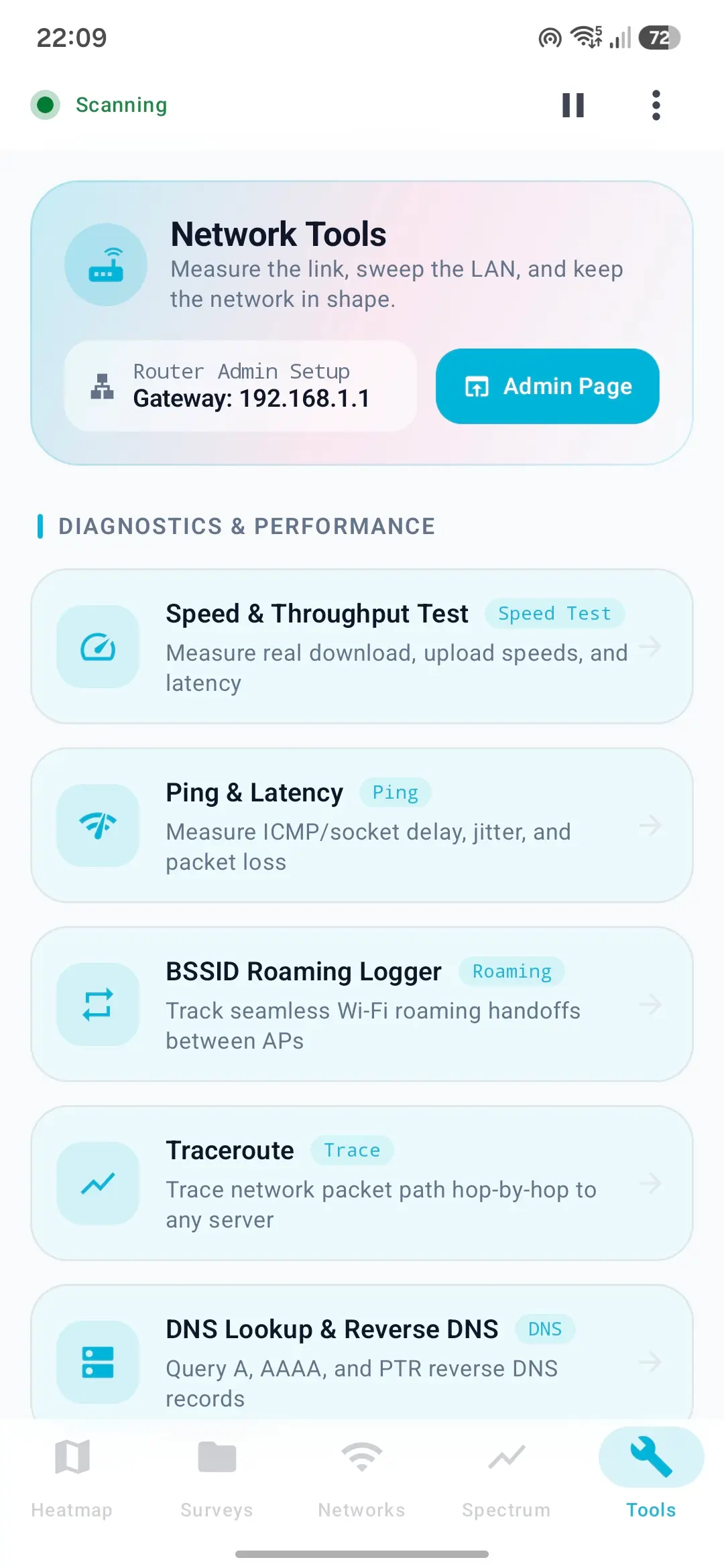
Jump straight to your router's admin page, then run real download and upload speed tests, ICMP ping and jitter checks, hop-by-hop traceroutes, and A / AAAA / PTR DNS lookups — all pointed at hosts you choose yourself.

  • One-tap router admin access via the detected gateway IP
  • Speed and throughput testing with live latency
  • Ping, jitter, packet-loss and traceroute utilities
  • A / AAAA / PTR DNS lookup and reverse DNS
  • BSSID roaming logger for seamless AP handoffs

The real app

Every screen, exactly as it ships

No mockups. These are live captures from WifiHeatmap 1.0.2 on Android, running on the same light and dark themes you can switch between in the app.
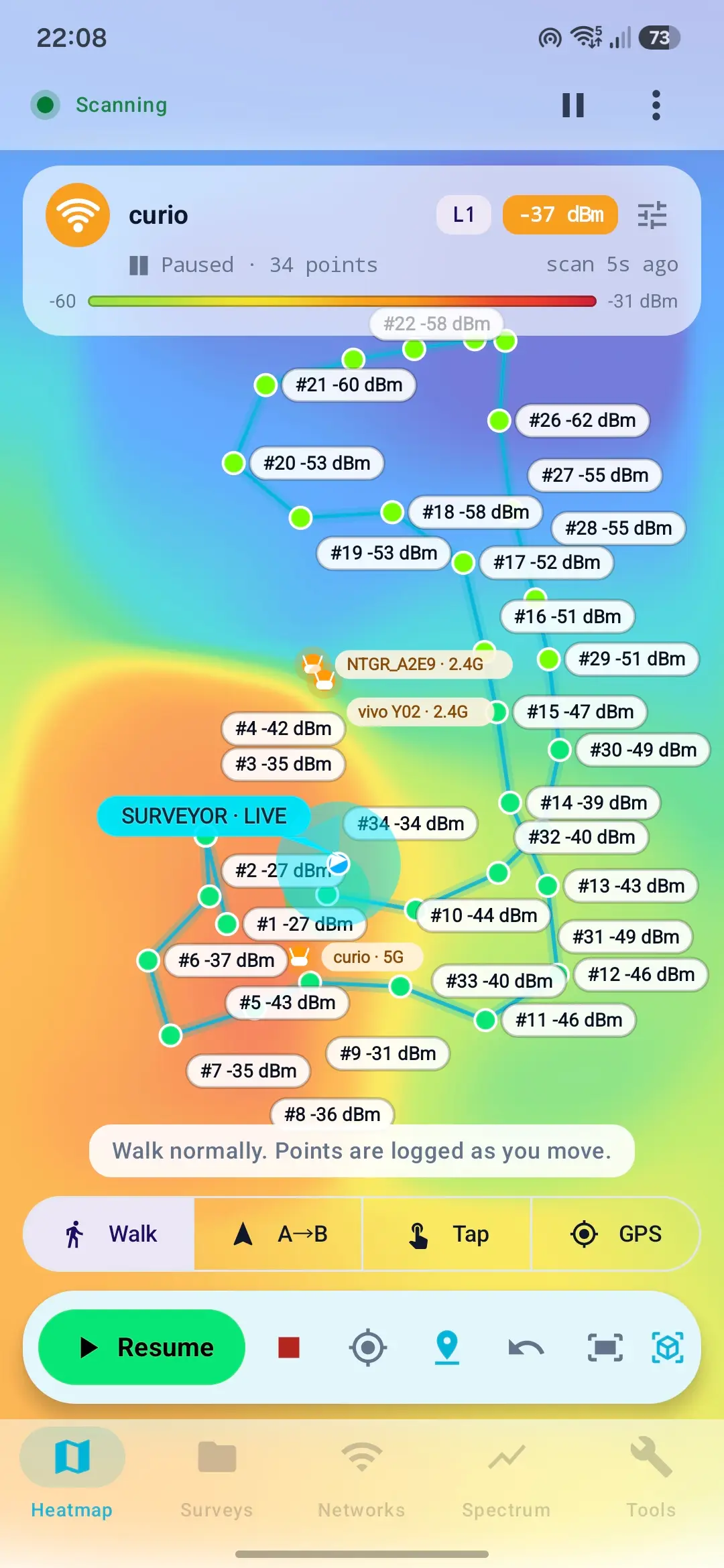
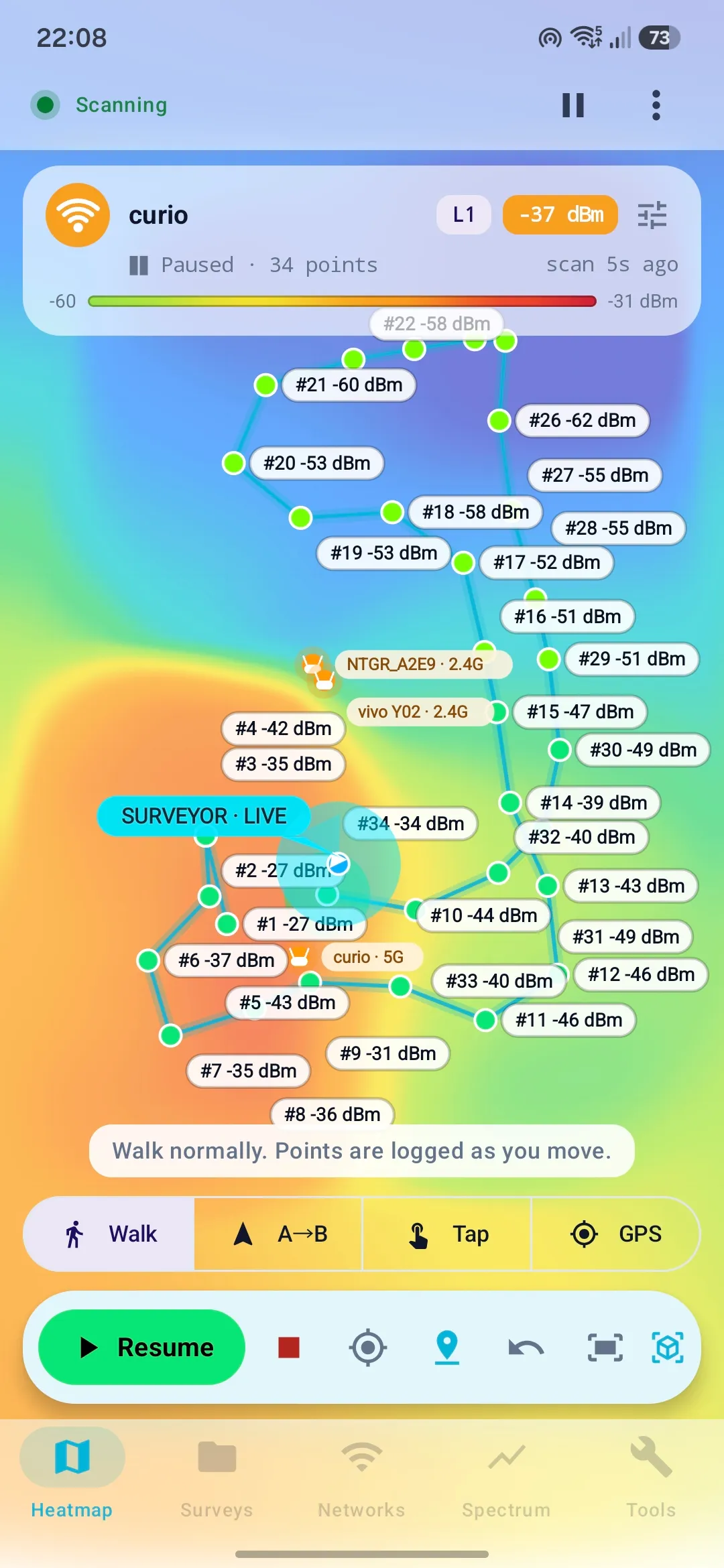
WifiHeatmap live floorplan survey in the light theme: a rainbow RF coverage heat haze in orange, yellow, green and blue over a floor plan, with a walked path and green sample markers labelled -31 dBm to -60 dBm
Floorplan heatmap survey
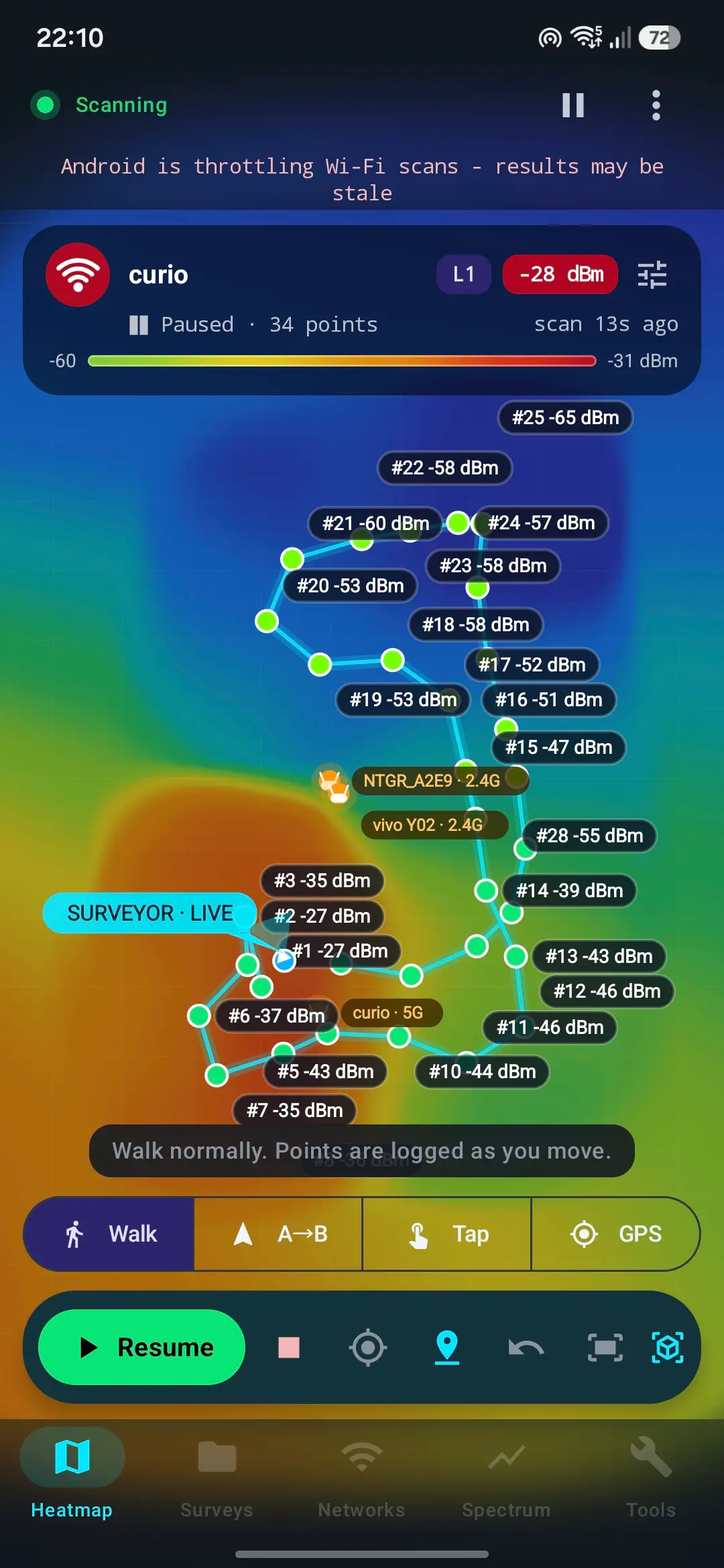
WifiHeatmap floorplan survey in the dark theme showing the same interpolated RF coverage field, the PDR walk trace and a scanning status bar
Coverage field (dark)
WifiHeatmap access point list showing the connected network curio at -32 dBm on channel 149 (5745 MHz) with vendor, frequency and channel width details
Access point inspector
WifiHeatmap spectrum channel graph plotting overlapping 2.4 GHz access point curves across channels 1 to 13 with a zoom control
Spectrum channels
WifiHeatmap channel rating screen recommending channels 9, 13 and 1 with one to five star ratings and access point counts per channel
Channel rating
WifiHeatmap network tools screen with router admin setup for gateway 192.168.1.1 plus speed test, ping, roaming, traceroute and DNS entries
Network toolkit

How it works

Four steps from floor plan to coverage map

  1. 01

    Import a floor plan

    Load any image of the space you are surveying — an office plan, a warehouse layout or a photo of the floor.

  2. 02

    Walk the space

    Walk normally with your phone. Step detection and compass heading plot your track automatically.

  3. 03

    Read the field

    Signal readings are interpolated into a live colour field so hot spots and dead zones are obvious at a glance.

  4. 04

    Export & act

    Save the heat report image or raw survey CSV, then configure your access point on the recommended channel.

Built for wireless professionals & enthusiasts

Enterprise-grade RF analysis, in your pocket

From campus Wi-Fi surveys to home mesh tuning, WifiHeatmap gives you complete technical control of your wireless environment.

PDR motion kinematics

Walk through a facility naturally. The adaptive Weinberg model calculates individual step length while the compass supplies heading, so your track is drawn on the map automatically.

Wi-Fi 6E & Wi-Fi 7 ready

Diagnose the clean 6 GHz band alongside legacy 2.4 GHz and 5 GHz, with bandwidth detection from 20 MHz all the way up to 320 MHz on 802.11be networks.

Channel rating optimiser

Eliminate co-channel congestion for good. Automated star-rating analysis reveals exactly which channels suffer from overlapping interference in your area.

Vendor / OUI lookup

Identify access point manufacturers instantly from the MAC address OUI — Cisco, Aruba, Ubiquiti, Apple, Netgear, TP-Link and thousands more.

Signal stability time graphs

Catch intermittent dropouts, roaming packet loss and signal fluctuation. The time graph tracks RSSI across continuous scan iterations in real time.

100% offline & private

No telemetry, no cloud accounts, no data tracking. Every measurement, floor plan and RF calculation stays on your device.

Who it's for

One app, four very different jobs

If a problem is about radio coverage or channel choice, WifiHeatmap measures it directly instead of guessing.

  • Enterprise site surveys

    Validate an office, campus or warehouse floor plan before you sign off the AP layout — and keep the heat map as client-facing evidence.

  • Dead-zone hunting

    Walk the building, watch the colour field, and find exactly where coverage drops below -67 dBm before staff start complaining.

  • Home & mesh tuning

    Compare rooms, find the position where your router performs best and pick a channel that is not fighting your neighbours.

  • Interference forensics

    Spot a crowded 2.4 GHz band, an unstable 5 GHz link or a legacy 802.11b device dragging down your throughput.

FAQ

Frequently asked questions

Everything about permissions, scan throttling, accuracy and privacy.

Does WifiHeatmap need an internet connection?

No. Every feature — scanning, channel graphs, heatmap surveys, channel rating and report exports — runs entirely on your device. The app requests no internet permission for its core functionality and contains no telemetry, analytics or background tracking. The optional Network Tools (ping, traceroute, DNS, speed test) is the only part that touches the network, and only against hosts you explicitly choose.

Why does Android require the Location permission to scan Wi-Fi?

Since Android 6.0 the operating system classifies Wi-Fi beacon frame scanning as location-sensitive data, because nearby BSSIDs could theoretically be correlated to coordinates. Android therefore returns empty scan results unless ACCESS_FINE_LOCATION is granted. WifiHeatmap processes beacon frames in local memory only — your location is never logged, stored or transmitted.

What is the Physical Activity permission used for?

ACTIVITY_RECOGNITION powers the hardware step detector during floorplan heatmap surveys. It lets Pedestrian Dead Reckoning (PDR) chart your footsteps on the map as you walk, using the adaptive Weinberg formula for step length combined with compass heading. Step data is only recorded during an active survey and is discarded when the session ends.

How accurate are the floorplan heatmaps?

WifiHeatmap interpolates your sampled signal readings across the imported floor plan using Inverse Distance Weighting (IDW), which is the standard approach for radio propagation modelling between sparse measurement points. Accuracy depends on how densely you sample the space — the closer your walk steps are to the areas you care about, the more faithfully the contour reflects real coverage. Walls, furniture and multi-floor buildings all affect RF propagation.

Can I bypass Android's Wi-Fi scan throttling?

Android 9+ limits foreground Wi-Fi scans to four per two minutes, which can make results look stale. On Android 10 and newer you can lift the limit under Settings > Developer Options > Networking > Wi-Fi scan throttling. With throttling off, scans run every two to four seconds, which is ideal for dense surveys. The app also warns you in-app when it detects that scans are being throttled.

Can WifiHeatmap crack passwords or hack networks?

No. WifiHeatmap is strictly a legal, professional diagnostic and surveying utility. It does not perform penetration testing, packet injection, deauthentication or credential cracking of any kind. It only observes beacon frames that your own device's Wi-Fi radio already receives.

Which Wi-Fi generations and channels are supported?

2.4 GHz, 5 GHz and 6 GHz bands are supported, including Wi-Fi 6E and Wi-Fi 7. Channel width detection covers 20, 40, 80, 160 and 320 MHz. The app also identifies the IEEE standard behind each access point (802.11n/ac/ax/be), the security type (WPA3, WPA2, WPA, WEP, WPS, OWE, EAP) and fast-roaming flags (802.11k, 802.11v, 802.11r, OKC).

How much does WifiHeatmap cost?

Nothing. WifiHeatmap is free on Google Play, requires no account and contains no advertisements or in-app purchases.

Map your coverage. Ship a better network.

Survey, analyse and optimise your indoor wireless environment with professional precision — offline, with zero cloud telemetry.

Free · Android 7.0+ · No account required · No telemetry